
How to pay
We accept payment by mobile transfer. It takes about a minute — here is exactly how it works.
- 1Fill your basket and check outChoose store pickup or delivery, then continue to the payment step. The exact amount to send is shown there.
- 2Send the money by mobile transferOpen your mobile payment app and transfer the exact total to one of our numbers below.
- 3Take a screenshot of the confirmationMake sure the amount, the receiving number and the date are all visible in the picture.
- 4Upload it and place the orderAttach the screenshot at checkout. We verify it and confirm your order — usually within our shop opening hours.
Our MobilePay box numbers
Send the exact order total to one of these MobilePay box numbers.
Payment numbers have not been published yet. Please contact the shop before ordering.
What a good screenshot looks like
Your screenshot needs the amount, the receiving number and the date.
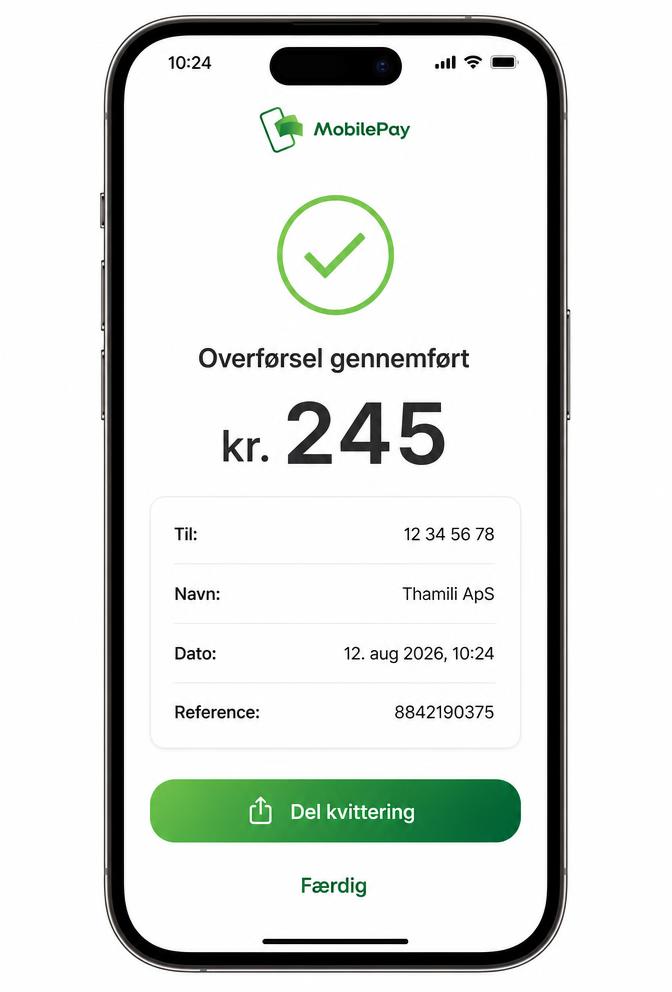
- The full amount you sent is readable.
- The receiving MobilePay box number matches one of ours.
- The date, time and reference are visible.
- Blurred or cropped pictures slow verification down, and may be rejected.
After you upload
- Your order is created as waiting for confirmation — it is not confirmed until our team verifies the payment.
- We check payments during shop opening hours and message you as soon as it is confirmed.
- If something is wrong with the payment we will explain why and you can upload a new screenshot from the tracking page.